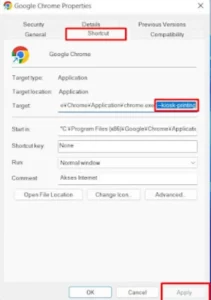
Make Direct Print without Print Preview in Google Chrome. Direct print is important for a web application, the article with direct print can speed up the transaction process without having to see a preview of the sales note to be printed, the method is as follows: Make Direct Print without Print Preview in Google Chrome 1. Right click on the google chrome icon then select properties 2. on the Shortcut tab menu section in the target textbox please add the code –kiosk-printing after the code “C:\Program Files (x86)\Google\Chrome\Application\chrome.exe” see the picture below for more details 3. After that, click Apply and click Ok. Read: Setting Port Forwarding on Indihome HG6145F Fiberhome Modem Easily 4. Open google chrome and please print, if successful then when you print it will not appear […]